
Built on Google Calendar
Works with the calendar your family already uses, on iPhone, Android and computers. No new app to install.
Your Weekly Family Planner · Coming soon
Fridge Calendar keeps your family’s meals, chores and activities together in one shared calendar: on everyone’s phone, and printed as one tidy weekly planner for the fridge.
The demo uses a sample family. No sign-up needed.
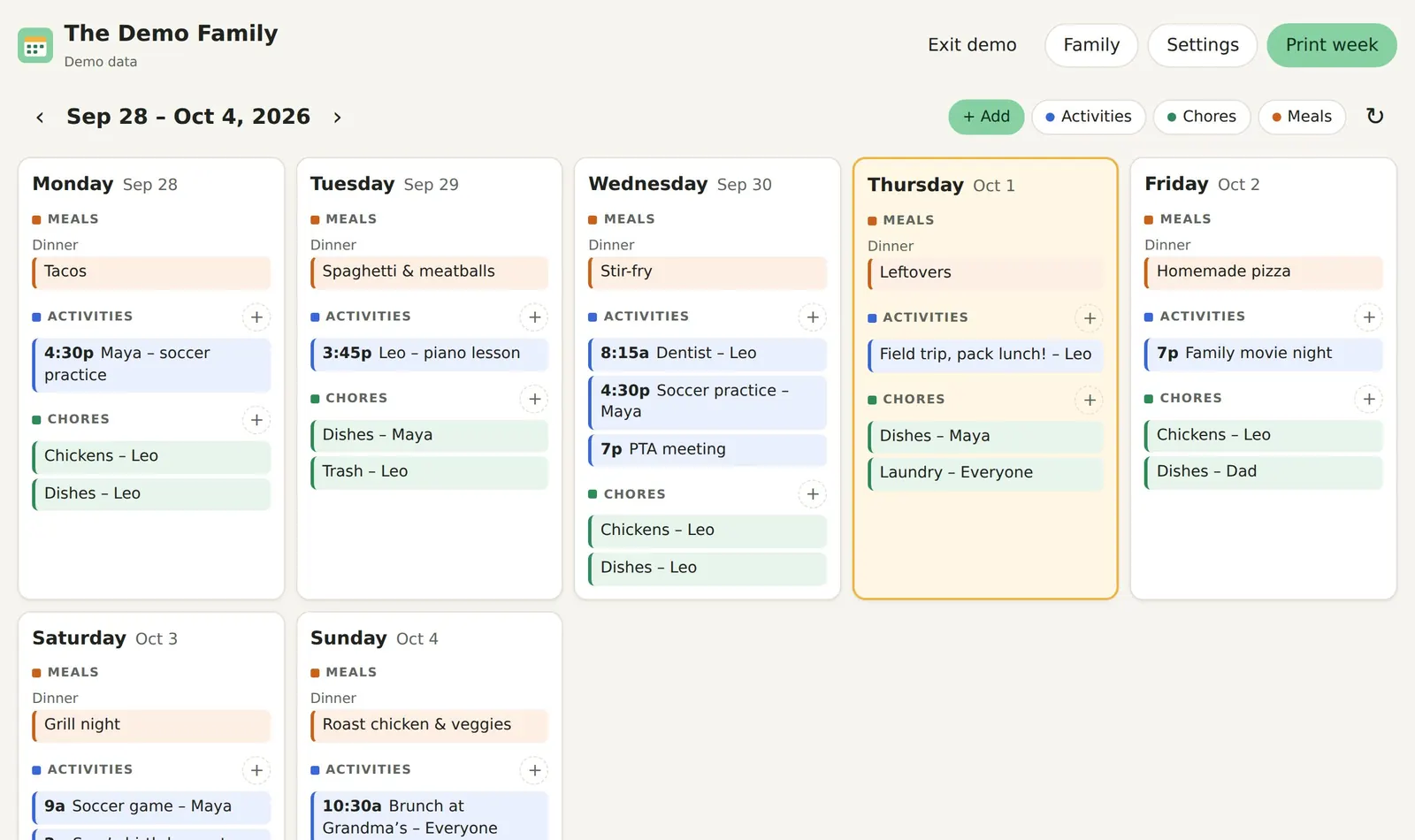

If you’re the one who knows that Tuesday is piano, Thursday is a half day, it’s Maya’s turn for dishes and there’s nothing planned for dinner on Wednesday, Fridge Calendar is for you. It takes the weekly juggle out of your head and puts it where the whole family can see it, so you’re not the only one keeping track.
Meal planning
Plan the week’s dinners in a few minutes. Fridge Calendar remembers every meal you’ve planned, so as you type, your family’s favorites pop up, along with the sides you usually serve. It even suggests dinners you haven’t had in a while.

Chore charts
Add chores with who’s doing them, such as “Dishes – Maya” or “Feed the dog – Leo”, once or on repeat every day or weekday. When you print, chores become a chore chart grid with each child’s initial circled on their days, right next to the week’s plans.
Family calendar
Practices, lessons, appointments, school events and birthday parties all go in one shared family calendar. Because it’s Google Calendar underneath, everyone sees changes on their own phone straight away, with Google’s reminders and all.

Keep track of it all
Not everyone checks a phone, and the fridge is where the family looks. One click prints the whole week on a single page: the chore chart, what’s happening each day, and what’s for dinner. Choose day by day or the whole week at a glance, landscape or portrait. A busy week still fits on one page, and you can save it as a PDF to text to a grandparent or babysitter.
Not ready yet? Try our free printables: a weekly meal planner, a chore chart for kids and a weekly family planner.
Set up once in a few minutes. After that, it’s a quick planning session each week.
Sign in with Google and choose three calendars: Family for activities, Chores, and Meals. Use ones you already have, or let Fridge Calendar create them. They stay in your Google account.
Add your partner and kids by email and choose what each can do: edit, or just view. Or skip this step: you can run the whole planner on your own.
Add activities, hand out chores and plan dinners. Suggestions from past meals do most of the menu planning for you.
Print the week on one page and pin it up. When plans change, update it from any phone and reprint.
Works with the calendar your family already uses, on iPhone, Android and computers. No new app to install.
Suggestions come from what your family actually eats, so weekly meal planning takes minutes.
Assign chores to each child and print a chore chart with their initials, just like a paper one.
Busy week? The printout fits itself on one page, and things that happen every day are listed once.
One subscription covers everyone you invite, but inviting is optional. Parents manage it; older kids can add plans; younger kids view.
Your calendars stay in your Google account. We don’t keep copies of your events, and there are no ads, tracking cookies or data sales.
Fridge Calendar will be a small monthly subscription per family, with a discount when you pay for a year. The whole family is included. Pricing will be announced at launch. Sign up below to hear first.
Leave your email and we’ll let you know when Fridge Calendar opens. No spam, just the launch news.
Fridge Calendar is a weekly family planner. It brings your meal plan, chore chart and the family’s activities together in one place, on everyone’s phone, and prints the whole week on one page for the fridge.
Yes. You can plan dinners only (or breakfast, lunch and snacks too), add sides, and get suggestions from meals your family has had before. Chores and activities are there when you want them.
Yes. Chores like “Dishes – Maya” print as a chore chart grid with each child’s initial on their days, next to the week’s activities and the dinner menu.
Yes, you need a free Google account. Fridge Calendar keeps everything in Google Calendar, so you can keep using the Google Calendar app as well.
No. Only people who want to use the planner on their own phone or computer sign in, and younger kids can simply read the printout on the fridge.
Yes. Adding family members is optional. You can manage the meals, chores and activities on your own and print the week for the fridge. If your family wants the schedule on their phones, share the calendars from Google Calendar and they can see them in the Google Calendar app, Apple Calendar or any calendar app that connects to Google, without joining Fridge Calendar.
Yes. During setup you can pick calendars you already have for family activities, chores and meals, or create new ones. Anything you add in Google Calendar shows up in Fridge Calendar, and the other way round.
Fridge Calendar will be a small monthly subscription per family, with a discount for paying yearly. Pricing will be announced at launch.
Your events stay in your Google Calendars. Fridge Calendar reads them when you open the planner and doesn’t keep copies. Read the privacy policy for the details.